
Every email list has addresses that stop working. People change jobs, abandon old accounts, or mistype their address on a signup form. When you send to those addresses, the email bounces. How your email platform handles those bounces has a big effect on whether the rest of your mail reaches the inbox.
Here’s what bounces are, why they matter, and how MyEmailProgram uses suppression lists to protect your sender reputation automatically.
What is a bounce?
A bounce is a message sent back by the receiving mail server saying your email couldn’t be delivered. There are two kinds.
Hard bounces
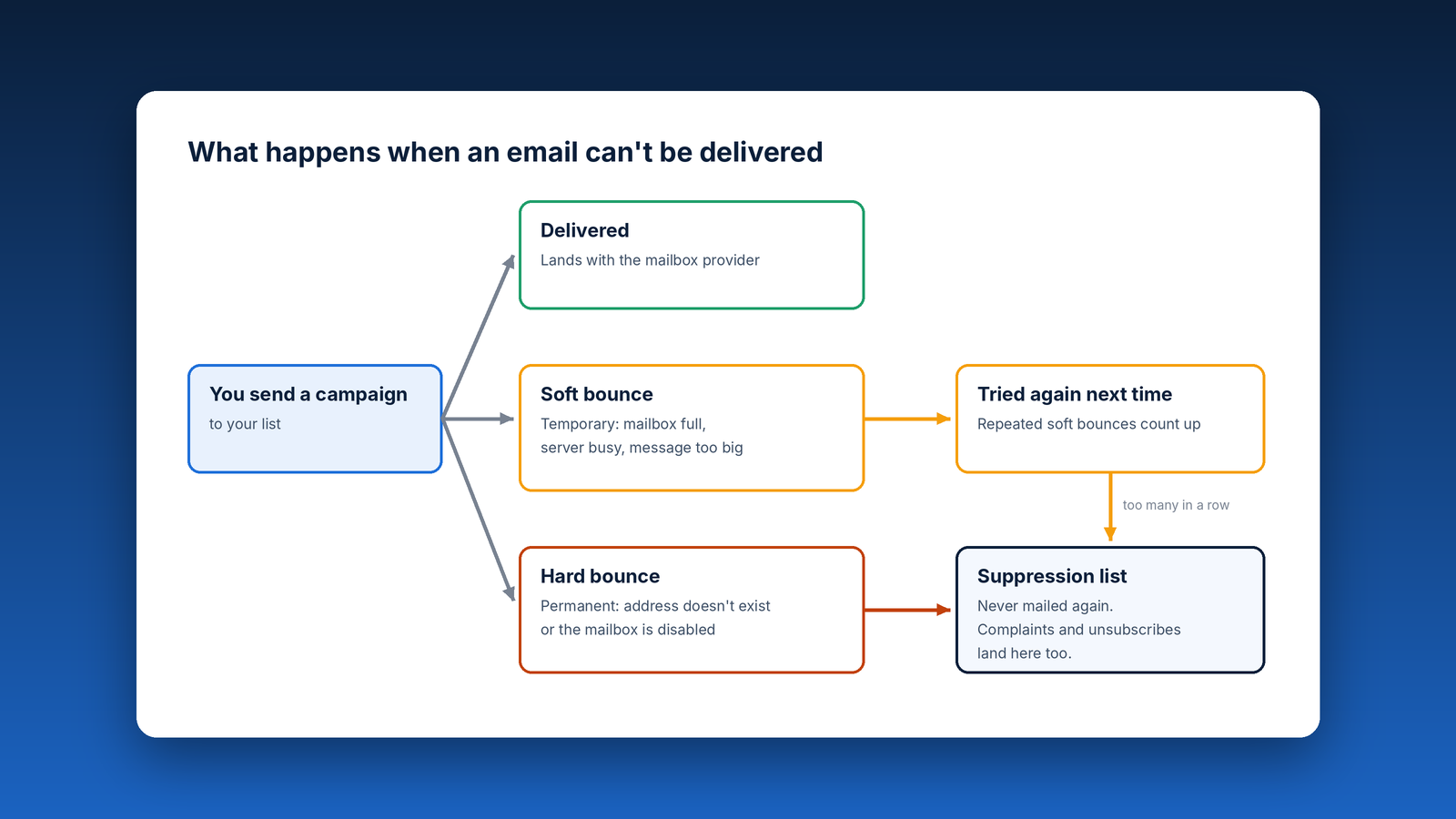
A hard bounce is a permanent failure. The address doesn’t exist, the domain is gone, or the mailbox has been disabled. Sending to it again will never work.
Soft bounces
A soft bounce is a temporary failure. The mailbox is full, the receiving server is busy or down, or the message is too large. The address itself is fine, so a later email may get through.
Why bounces affect your deliverability
Mailbox providers like Gmail, Yahoo, and Microsoft watch how often senders hit invalid addresses. A sender with lots of bounces looks like someone using an old, purchased, or poorly maintained list, and that’s exactly the behavior spam filters are built to catch.
A high bounce rate can mean:
- More of your email filtered to spam, even for subscribers who want it
- Slower delivery as providers throttle your mail
- Outright blocks from some providers
A good rule of thumb is to keep your bounce rate under 2% per campaign. Well-maintained lists usually stay well below that.
How MyEmailProgram handles bounces
MyEmailProgram processes bounces for you automatically:
- Hard bounces are suppressed right away. Once an address hard-bounces, it’s added to your suppression list and won’t be sent to again.
- Soft bounces get another chance. The contact stays active and is retried on future sends. If an address keeps soft-bouncing, it’s treated as a hard bounce and suppressed.
- Every bounce is recorded. Your campaign reports show which addresses bounced, the bounce type, and the reason, so you can spot problems with a list or a signup form.
What is a suppression list?
A suppression list is a do-not-send list. Any address on it is skipped automatically, even if it’s still on one of your contact lists. Addresses land there in a few ways:
- Hard bounces, as described above
- Spam complaints, when a subscriber marks your email as spam
- Unsubscribes, when a subscriber opts out
- Manual additions, when you add an address, a whole domain, or a list of addresses yourself
Suppression can apply to your whole account or to a single list. Account-wide suppression blocks an address everywhere. List-level suppression blocks it for one list only, which is useful when someone opts out of one type of email (like event announcements) but still wants others (like order updates or a newsletter).
Switching platforms? Bring your suppression list
This is one of the most important steps when you move to MyEmailProgram from another email platform, and one of the most often skipped.
Your old platform has a record of everyone who unsubscribed, bounced, or complained. If you export only your active subscribers and leave that record behind, you risk emailing people who already opted out or whose addresses are dead. That’s a fast way to pile up complaints and bounces on your very first send.
Before your first campaign:
- Export your unsubscribed, bounced, and complained contacts from your old platform. Most platforms offer these as separate exports.
- Import them into your MyEmailProgram suppression list.
- Then import your active subscribers. Anyone who also appears on the suppression list will be skipped automatically.
If you’d like help with a migration, let us know. It’s much easier to get right before the first send than to clean up after it.
Best practices for keeping bounces low
- Never buy or rent lists. Purchased lists are full of dead and trap addresses, and they violate our Anti-Spam Policy.
- Use confirmed opt-in when you can. A confirmation email catches typos and fake addresses before they reach your list.
- Send regularly. Lists go stale when they sit. Addresses that haven’t heard from you in a year or more are far more likely to bounce.
- Re-engage or remove inactive subscribers. Contacts who haven’t opened in many months are worth a re-engagement campaign. Remove them if they still don’t respond.
- Don’t remove addresses from suppression to “try again.” A hard-bounced address won’t come back to life, and a complaint or unsubscribe is a clear request to stop.
- Keep an eye on your reports. A sudden jump in bounces after an import or a new signup form is a signal to look at where those addresses came from.
Quick checklist
- Bounce rate under 2% per campaign
- Old platform’s unsubscribes, bounces, and complaints imported to suppression before your first send
- No purchased or rented lists
- Confirmed opt-in on signup forms where possible
- Inactive subscribers re-engaged or removed regularly
- Suppressed addresses left suppressed
Clean lists, consistent sending, and automatic suppression work together to keep your email in the inbox. Questions about your bounce rate or your suppression list? Get in touch.