
A dedicated IP address gives you full control of your sending reputation. Nobody else’s email habits can drag yours down. But a brand-new dedicated IP doesn’t come with a good reputation built in. It has no reputation at all, and Gmail, Yahoo, and Microsoft treat unknown senders with caution.
Warming up your IP means building that reputation on purpose: starting with small, well-targeted sends and growing your volume over a few weeks. Skip it, and your first big send can land in spam folders or get throttled.
Why warm-up matters
Mailbox providers judge every sending IP by its history. When a new IP suddenly sends tens of thousands of emails, it looks exactly like what spammers do. Providers respond by slowing delivery (deferring), filtering mail to spam, or blocking it.
When volume grows gradually and the first emails go to people who open and click, providers see a sender whose mail people want. That earns you more trust, and more volume, over time.
Not sure whether you need a dedicated IP? Read Shared vs. Dedicated IP Addresses for Email Sending.
Before you start
Warm-up works best when everything else is already in order:
- Authentication is set up. SPF, DKIM, and DMARC should be in place for your sending domain. Gmail and Yahoo require them for bulk senders.
- Your list is clean. Remove hard bounces and long-inactive contacts before you begin. Old, unengaged addresses are the fastest way to sink a new IP. See Bounces and Suppression Lists.
- Unsubscribing is easy. Keep a visible unsubscribe link in every email and turn on the List-Unsubscribe header.
- You have a plan. Know your target daily volume and roughly how long you’ll take to get there.
A sample warm-up schedule
Most dedicated IPs take about four to eight weeks to warm up. Here’s an example for a sender building to about 50,000 emails a day. Treat it as a starting point, not a rule. Slow down any time the warning signs below appear.
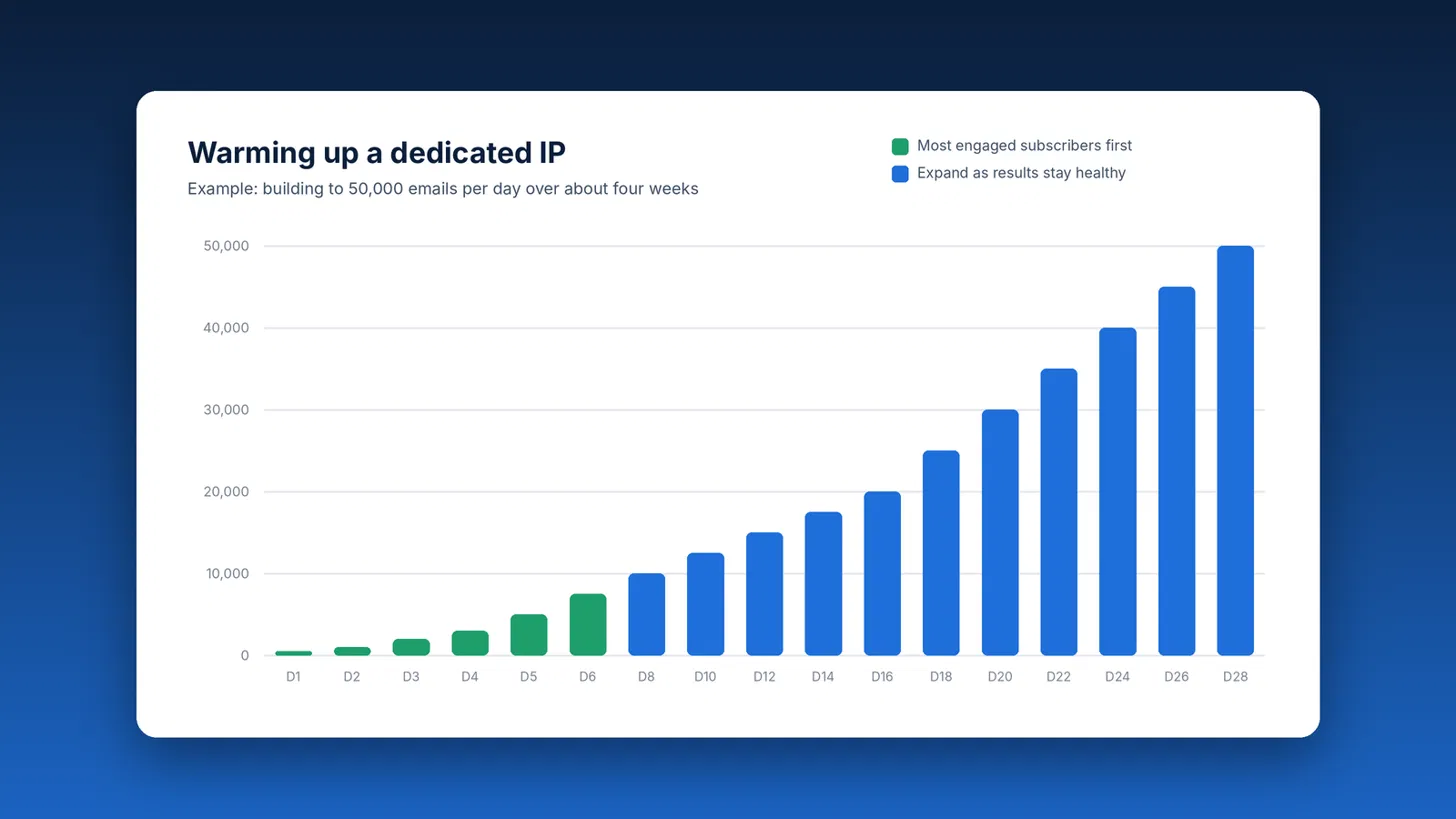
| Days | Emails per day | Who to send to |
|---|---|---|
| 1 to 2 | 500 to 1,000 | Your most engaged subscribers (opened or clicked recently) |
| 3 to 5 | 2,000 to 5,000 | Recently engaged subscribers and recent customers |
| 6 to 10 | 7,500 to 12,500 | Subscribers engaged in the last 90 days |
| 11 to 20 | 15,000 to 30,000 | Subscribers engaged in the last six months |
| 21 to 28+ | 35,000 to 50,000 | Your full active list |
A few tips for sticking to the plan:
- Send regularly. Reputation builds through consistent sending. If you normally email once a week, split each campaign across several days during warm-up instead of sending it all at once.
- Spread sends through the day. Limiting your hourly sending speed when you schedule a campaign keeps volume steady instead of arriving in one burst.
- Send your best content first. Early emails should be ones your audience is happy to get: a popular newsletter, a strong offer, or useful news.
- Watch each provider separately. Gmail, Yahoo, and Microsoft each judge you independently. If one starts deferring or filtering your mail, slow down for that provider rather than your whole list.
Warning signs to watch
Check your campaign reports after every send during warm-up. Hold your volume steady, or cut back, if you see:
- Spam complaints creeping up. Google recommends staying under 0.1%, and Gmail and Yahoo require bulk senders to stay below 0.3%.
- Bounces rising. A jump in hard bounces usually means old or bad addresses slipped into your sends.
- Opens or clicks dropping. A sudden drop can mean your mail is landing in spam.
- Deferrals or blocks. If a provider starts delaying or rejecting your mail, pause, fix the cause, and resume at a lower volume.
When the numbers look healthy, keep increasing. When they don’t, wait a few days before increasing again. A slower warm-up is better than starting over with a damaged reputation.
After warm-up
Warm-up isn’t a one-time event. Your reputation reflects how you send every day. Keep sending consistently, keep your list clean, and avoid long gaps followed by sudden huge sends. If you stop sending for several weeks, ease back in rather than jumping straight to full volume.
Dedicated IPs at MyEmailProgram
A dedicated IP is available on any MyEmailProgram plan for an additional $25 per month. If you’re adding one, talk to us before your first send, and we’ll help you plan a warm-up that fits your list and sending schedule.