
Every marketing email you send should give subscribers a way out. Most senders think of that as the little unsubscribe link at the bottom of the email. But there’s a second unsubscribe option that matters just as much to your deliverability, and many senders have never turned it on: the List-Unsubscribe header.
If you’ve ever noticed an “Unsubscribe” button next to a sender’s name at the top of an email in Gmail, Yahoo, or Apple Mail, you’ve seen a List-Unsubscribe header at work. Here’s what it is, why the big inbox providers care so much about it, and how to make sure every campaign you send includes one.
What is a List-Unsubscribe header?
Every email carries a set of technical “headers” that subscribers never see: who sent it, when, the route it took, and so on. A List-Unsubscribe header is one of those hidden lines. It tells the subscriber’s email app exactly how to remove that person from your list.
When an email app finds that header, it can display its own Unsubscribe button in a consistent place, usually right beside your name or at the top of the message. The header can point to:
- An unsubscribe link (a web address that processes the request), and/or
- An unsubscribe email address (the app sends a removal request on the subscriber’s behalf).
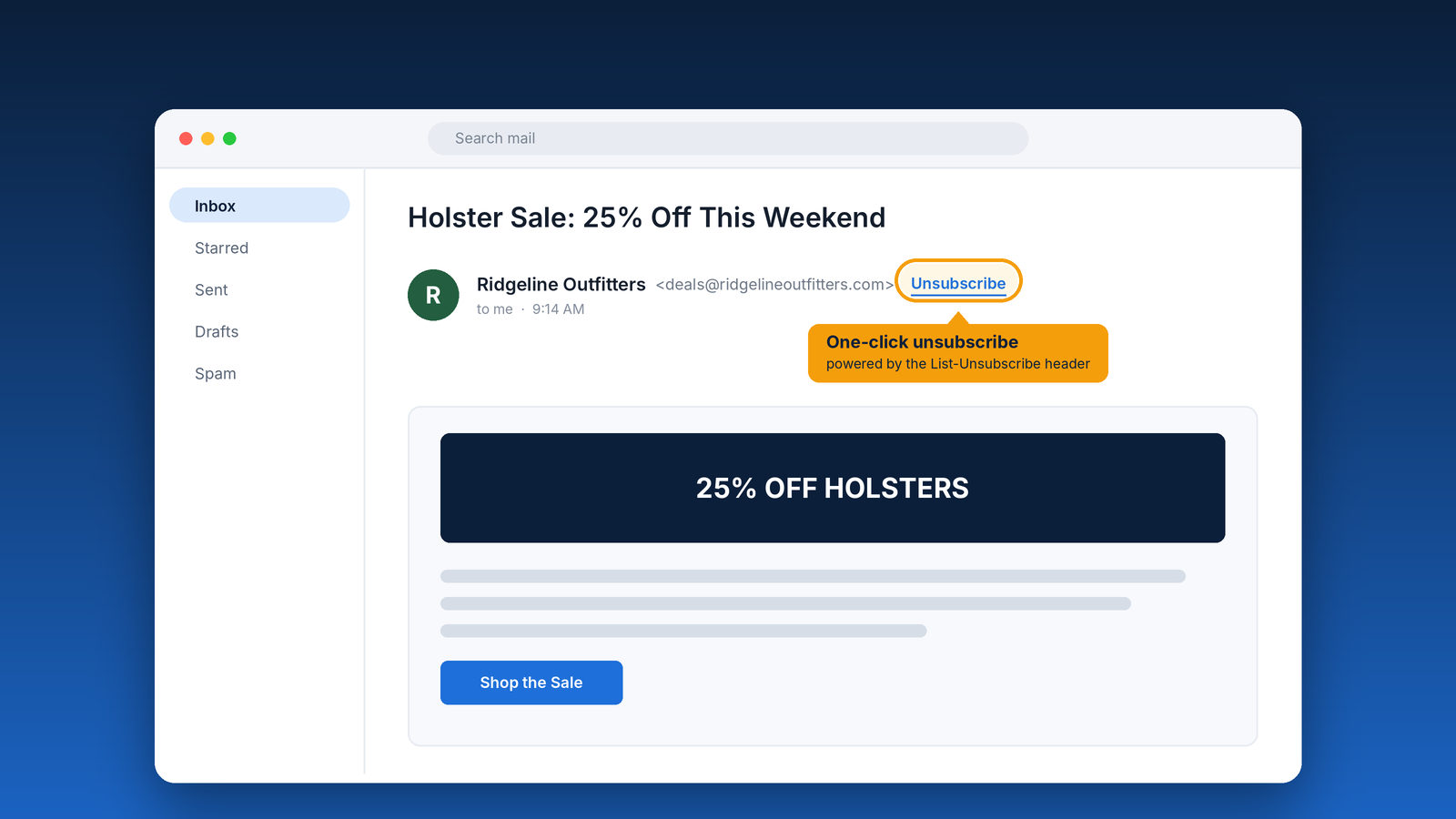
A newer version, often called one-click unsubscribe, adds a companion header so the email app can complete the unsubscribe instantly, without sending the subscriber to a web page at all. This standard is known in the industry as RFC 8058.
Why inbox providers value List-Unsubscribe headers
Gmail, Yahoo, and Microsoft all want the same thing: inboxes full of email people actually want. An easy, reliable way to leave a list is one of their most important tools for getting there, and they now require it from serious senders.
- Gmail and Yahoo (since February 2024): Bulk senders, which Google defines as sending more than 5,000 messages a day to Gmail addresses, must support one-click unsubscribe through List-Unsubscribe headers and honor unsubscribe requests within two days. They must also keep their spam complaint rate below 0.3%.
- Microsoft Outlook (since May 2025): High-volume senders to Outlook.com, Hotmail, and Live addresses must include a visible, working way to unsubscribe, alongside proper email authentication.
Even if you send less than these thresholds, the providers treat these rules as best practice for everyone. Including List-Unsubscribe headers signals that you’re a legitimate sender who respects your subscribers, and that’s exactly the kind of sender inbox providers want to deliver.
When you should use them
The short answer: on every marketing or bulk email. That includes:
- Newsletters and announcements
- Sales, promotions, and new product launches
- Event, class, and range-day invitations
- Automated drip campaigns and autoresponders
- Re-engagement and win-back campaigns
Purely transactional messages, like order confirmations, shipping notices, receipts, and password resets, are generally exempt from the one-click requirement. Those are emails your customers need, not marketing they signed up for.
One important note: a List-Unsubscribe header doesn’t replace the unsubscribe link in your email footer. The CAN-SPAM Act still requires a clear and conspicuous opt-out in the message itself, and not every email app displays the header button. Use both, every time.
Why subscribers appreciate them
From a subscriber’s point of view, a List-Unsubscribe header is pure convenience. The Unsubscribe button shows up in the same place for every sender, so there’s no scrolling to the bottom of a long email, no hunting through tiny gray text, and no logging in to an account just to stop hearing from someone.
That ease builds trust. Subscribers who know they can leave anytime are more comfortable signing up in the first place, and they tend to think better of brands that respect their inbox. People who feel trapped, on the other hand, don’t stay. They just reach for a different button.
How List-Unsubscribe headers reduce spam complaints
That different button is the spam button, and it’s the real reason List-Unsubscribe headers matter so much.
When someone no longer wants your emails and can’t quickly find a way out, the fastest option is to click “Report spam.” To you, an unsubscribe and a spam report might feel similar, since either way that person is gone. To the inbox providers, they’re completely different:
- An unsubscribe is a normal, healthy part of managing a list. It doesn’t count against you.
- A spam complaint is a direct mark against your sender reputation.
Gmail’s 0.3% threshold works out to just three complaints for every 1,000 emails delivered, and many deliverability experts recommend staying under 0.1%. When the Unsubscribe button sits right next to your name, many of the people who would have reported you as spam simply unsubscribe instead. That one setting can keep you well clear of the danger zone.
What it means for your overall deliverability
Fewer spam complaints mean a stronger sender reputation, and a strong reputation is what gets your email into the inbox instead of the spam folder. List-Unsubscribe headers also help in quieter ways:
- Cleaner lists. People who aren’t interested remove themselves, so your list is made up of subscribers who actually want to hear from you.
- Better engagement rates. Your open and click rates improve when uninterested readers leave, and inbox providers watch engagement closely.
- Compliance with provider rules. Meeting Gmail, Yahoo, and Microsoft requirements keeps you from being throttled, filtered, or rejected.
For businesses in the firearm industry, this matters even more. You already work harder than most to find platforms that will carry your message. A spotless sender reputation means the inbox providers have no reason to stand between you and your customers.
How to add List-Unsubscribe headers in MyEmailProgram
MyEmailProgram supports List-Unsubscribe headers, including the one-click version Gmail and Yahoo require, as part of the normal campaign scheduling process. The header is a per-campaign setting, so here’s how to make sure every campaign has it:
- Build your campaign as usual, and keep a visible unsubscribe link in your email footer.
- Schedule it under Actions → Schedule, and work through the steps until you reach the final Settings step.
- Turn on “Add List-Unsubscribe header.” You’ll find it in the Email Headers section of that step. It’s off by default, so make it part of your pre-send checklist for every marketing campaign. While you’re there, confirm that Insert Unsubscribe Link is on, too.
- Schedule or send your campaign. Subscribers who use the header to opt out are unsubscribed automatically, so they won’t receive future campaigns to that list.
- Test it with a real send. The test preview tool doesn’t generate live unsubscribe links, so schedule your campaign to a small test list that includes a Gmail or Yahoo address you control. Look for the Unsubscribe option next to your name, or open the message’s original source and look for the List-Unsubscribe and List-Unsubscribe-Post headers. (Inbox providers sometimes only show the button for senders with an established sending history, so don’t worry if it doesn’t appear right away.)
Then keep an eye on your campaign reports. A steady trickle of unsubscribes is normal and healthy. A rising number of spam complaints is the signal to look more closely at your content, your sending frequency, or how subscribers joined your list.
Quick checklist
- “Add List-Unsubscribe header” turned on for every marketing campaign you schedule
- One-click unsubscribe confirmed in a real test send
- A visible unsubscribe link in every email footer
- Unsubscribes honored quickly (Gmail and Yahoo expect two days or less)
- Spam complaint rate below 0.3%, ideally below 0.1%
- SPF, DKIM, and DMARC set up for your sending domain
Make it easy to leave, and more people will stay
It sounds backwards, but making it easier to unsubscribe is one of the best things you can do for your email marketing. It keeps your list healthy, your complaint rate low, and your emails in the inbox for the customers who want them.
Need help setting up List-Unsubscribe headers or reviewing your deliverability? Talk to our team. We help firearm businesses get to the inbox and stay there.