
Your subject line gets all the attention, but it isn’t the only thing subscribers read before they decide to open. Right beside or below it in the inbox is a second line of text: the preheader, also called preview text. Think of it as your second subject line.
If you don’t set it on purpose, the inbox fills it with whatever text appears first in your email. That’s how you end up with a great subject line followed by “View this email in your browser | Follow us on Facebook.” Here’s how to take control of that space.
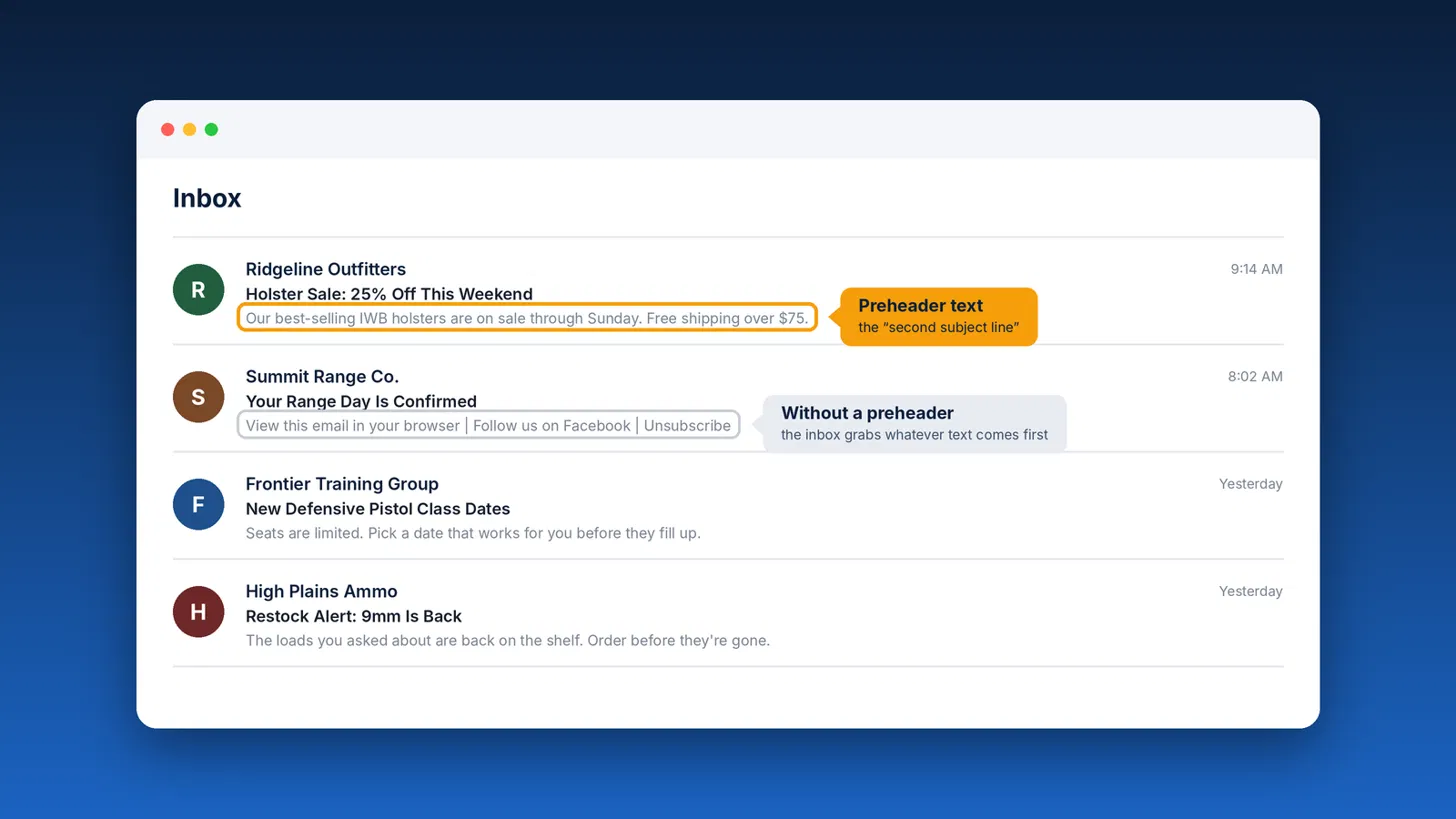
What is preheader text?
Preheader text is the short preview Gmail, Apple Mail, Outlook, Yahoo, and most mobile apps show after the sender name and subject line. It gives subscribers a little more context before they open.
Email apps pull this preview from the first readable text in your email. If your email starts with a “view in browser” link, an image’s alt text, or a row of social links, that’s what subscribers see.
Why it matters
- More room to earn the open. Your subject line has a few seconds to work. The preheader doubles the space you have to make your case.
- It looks professional. Leftover template text makes an email look careless and generic. A deliberate preheader makes it look intentional.
- It’s prime real estate on mobile. Most email is read on a phone, where the subject and preheader are nearly all a subscriber sees before deciding to open, scroll past, or delete.
How to write a good preheader
- Add to the subject line, don’t repeat it. If the subject is “Holster Sale: 25% Off This Weekend,” the preheader can add the detail: “Our best-selling IWB holsters are on sale through Sunday. Free shipping over $75.”
- Front-load the important words. Different apps show different amounts, so put the most important words first. Aim for roughly 40 to 100 characters.
- Give a reason to open. A deadline, a benefit, a question, or a specific detail all work well.
- Match the email. Don’t promise something in the preheader that the email doesn’t deliver. That’s a quick way to earn unsubscribes and spam complaints.
- Personalize when it fits. Merge tags like a first name or a class date can make the preview feel written for one person.
How to set preheader text in MyEmailProgram
When you build a broadcast in the campaign editor, use the Pre-header field. Type your preview text there, and MyEmailProgram adds it to your email for you. That’s all most senders need.
Building emails through the API or with your own HTML
The Pre-header field isn’t available through the MyEmailProgram API. If you create broadcasts through the API, or you paste in finished HTML from another tool, build the preheader right into your HTML instead. Add a short block of hidden text at the very top of the email. It shows up in the inbox preview but stays invisible when the email is opened.
- Open your email’s HTML.
- Find the opening
<body>tag. Paste the snippet below immediately after it, before anything else in the email. - Replace the sample sentence with your own preview text.
- Save your email and send yourself a test.
<div style="display:none; max-height:0; overflow:hidden; mso-hide:all; font-size:1px; line-height:1px; color:#ffffff; opacity:0;">
Our best-selling IWB holsters are on sale through Sunday. Free shipping over $75.
͏ ‌ ͏ ‌ ͏ ‌ ͏ ‌ ͏ ‌
</div>The repeated characters on the third line are invisible spacers. They fill the rest of the preview so the inbox doesn’t pull in your “view in browser” link or other text after your preheader. Copy that line a few more times if a longer preview still shows unwanted text.
Test before you send
Send a test to the inboxes your subscribers use most, at minimum a Gmail address and an iPhone. Check that:
- Your preview text appears right after the subject line
- No leftover template text follows it
- The hidden text doesn’t show when the email is opened
Inbox previews vary by app and screen size, so don’t worry if one app shows a few more or fewer words than another.
Quick checklist
- Preheader adds new information instead of repeating the subject
- Most important words come first
- Pre-header field filled in (or, for API and custom HTML emails, a hidden preheader block right after the
<body>tag) - Tested in Gmail and on a phone before sending
Need a hand setting up preheaders in your templates? Get in touch, and we’ll help you get it right.